Public-API
Welcome to our API documentation
Envi.Cloud API is the central point to access the data sent by an Envi.Baseenvi.baseDe energiecontroller van Envitron die apparaten uitleest, aanstuurt en data opslaat achter de hoofdaansluiting..
On this page you will find information about how to use our API and what you can find in the API.
Our API is following the REST principles, for more information about RESTful API's, see Representational state transfer.
All API access is over HTTPS (using HTTP protocol). All request and response bodies are formatted as JSON.
Response codes
Our API uses conventional HTTP response codes to indicate the success or failure of an API request.
2xx success
This class of codes indicates the request is accepted, examples:
- 200: Successful response (with content)
- 201: Created (object)
- 204: No content
4xx client errors
This class of codes indicates an error occurred during the request, i.e. a required parameter missing. Examples:
- 400: Syntax or format error (bad request)
- 401: Unauthorized
- 404: Not found (requested object does not exist)
- 429: Too many requests (rate limit reached, we recommend an exponential backoff of your requests. Also used when too many attempts to obtain a token pair fail.)
5xx server errors
This class of codes indicates a server error, something went wrong at our side. Example:
- 500: Server error
Timestamps
Timestamps used in our API are displayed in EPOCH time format and in UTC time, see Epoch time. Conversion is possible through multiple website such as: www.epochconverter.com.
If a timestamp is indicating an interval, then it specifies the start timestamp.
Examples:
Timestamp (Epoch): 1609484400
Date and time (GMT): Friday 1 January 2021 07:00:00
Date and time (Europe/Amsterdam): Friday 1 January 2021 08:00:00 GMT+01:00
Authentication
Authentication is done by using JSON Web Tokens: JWT.
You need an access token to use our authenticated endpoints. Almost all our endpoints need authentication.
You can get an access token by providing the supplied username and password, for more info look here.
Example request:
$ curl -X POST "https://api.envitron.nl/public-api/token/" -H "Accept: application/json" -H "Content-Type: application/json" -d "{ "username": "your_username_here", "password": "your_password_here"}"
Example response:
{
  "refresh": "eyJ0eXAiOiJKV1QiLCJhbGciOiJIUzI1NiJ9.eyJ0b2tlbl90eXBlIjoicmVmcmVzaCIsImV4cCI6MTYxMTA1MTc5NCwianRpIjoiUnBJam9pWlRNd05XTmlZIiwidXNlcl9pZCI6MX0.LIDpBo7VcQQ4sXbeF5LeExuvHCYccA90xOeWTdUnzZk",
  "access": "eyJ0eXAiOiJKV1QiLCJhbGciOiJIUzI1NiJ9.eyJ0b2tlbl90eXBlIjoiYWNjZXNzIiwiZXhwIjoxNjEwNDQ3ODk0LCJqdGkiOiJHa2lPaUpsTldVME1UTmtNRyIsInVzZXJfaWQiOjF9.M8mh2MqyBqqCXfpSFdX-YuIRswX7RRAV5HSUNxYkTeI"
}
Access token
Access tokens are valid for 15 minutes.
With the access token you can authenticate yourself when using our API's by providing a header:
Authorization: Bearer <access token>
Below you can find an example using this authentication header.
Example request (with authentication):
$ curl -X GET "https://api.envitron.nl/public-api/example/" -H "Accept: application/json" -H "Authorization: Bearer eyJ0eXAiOiJKV1QiLCJhbGciOiJIUzI1NiJ9.eyJ0b2tlbl90eXBlIjoiYWNjZXNzIiwiZXhwIjoxNjEwNDQ3ODk0LCJqdGkiOiJHa2lPaUpsTldVME1UTmtNRyIsInVzZXJfaWQiOjF9.M8mh2MqyBqqCXfpSFdX-YuIRswX7RRAV5HSUNxYkTeI"
Example response (with authentication):
{
  "example": "Hello, World!"
}
Refresh token
If the access token has expired, you need to refresh it with the refresh token you received on successful authentication to call our API's again. Please do not get a new access token again (using the endpoint /public-api/token/), because the amount of outstanding tokens is limited. Instead, use the endpoint /public-api/token/refresh/ with the refresh token to get yourself a new refresh and access token.
Refresh tokens are valid for 60 days.
Limits
We have set limits on our API to protect the Envi.Cloud from processing more data than it can handle.
Current limits:
- 500 requests for each building linked to the user per hour
- 50 outstanding refresh tokens per user at the same time
The limits are subject to change. Do you think this is not enough in your situation? Please send an email to support at envitron.com.
Request Example:
If the current user has 3 buildings linked to their account, they would have a total of 1500 requests available per hour.
Frequently Asked Questions (FAQ)
Why do I get a HTTP 403 'Forbidden' response with message 'Too many outstanding tokens.'?
For security reasons we do not accept too many outstanding access and refresh tokens at the same time. So, if an access token is expired, you should not refresh it by retrieving a new one at the endpoint /public-api/token/. Instead, use the following endpoint /public-api/token/refresh/ with the refresh token to get yourself a new refresh and access token. By using refresh tokens you do not need to provide usernames and passwords too often.
Refresh tokens will be cleared when they are invalid (after 60 days), so you can wait for it, or send us an e-mail to support at envitron.com to fix this for you.
Why do I get a HTTP 401 'Unauthorized' response with message 'Token is blacklisted.'?
You can use a refresh token only once. The used refresh token will be blacklisted if it is used to get a new access and refresh token. So you should keep your refresh token if you use the endpoint /public-api/token/refresh/, and use it the next time to refresh tokens.
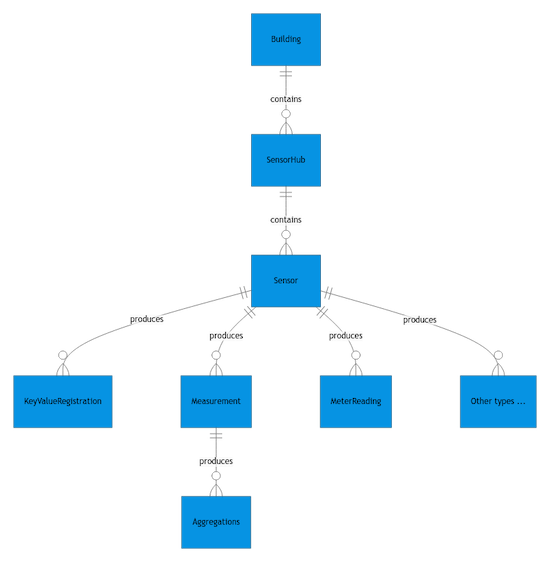
What is the relationship and difference between sensorhubs and sensors?
A sensor_hub is a collection of one or more sensors. For example a smart meter is a sensor_hub which consists of a sensor for delivery and a sensor for return_delivery.
Another example of a sensor_hub could be a water meter which consists of a sensor for water_volume in m3 and a sensor for water_flow in L/h.
Authentication
- HTTP: Bearer Auth
Security Scheme Type: | http |
|---|---|
HTTP Authorization Scheme: | bearer |
Bearer format: | JWT |