
2 posts tagged with "Watt portal"

Updates in the Watt portal.

View all tags

Analyse your energy systems in detail

A dedicated place per installation

Open an installation and choose Analyses. Everything you need to investigate its behaviour is in one place.

Data and control side by side

See not only what a battery or inverter did, but also which signal was behind it.

Ready-made or build your own

Start from a view, or add your own charts and compare periods.

New: download data

Take the data into your own tools

Use the download button below each chart to get the data for your own analysis or reporting.

  • Excel fileFor the interval you selected
  • Quarter-hour data as CSVRaw quarter-hour values, up to a year back
More about exporting data
New: one chart per question

Ask your question, see the answer straight away

Generation, battery, grid and consumption used to share one large chart, where you had to find the answer yourself. Now we've split that up: each chart answers one question.
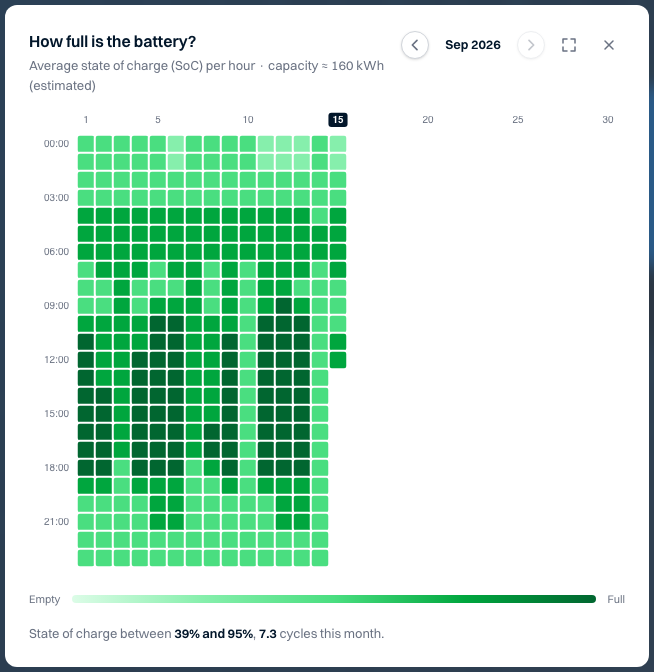
Heatmap of the battery's state of charge per hour over a month
Battery

Why was the battery empty before the evening peak?

See how full the battery was for every hour, the whole month in one view.
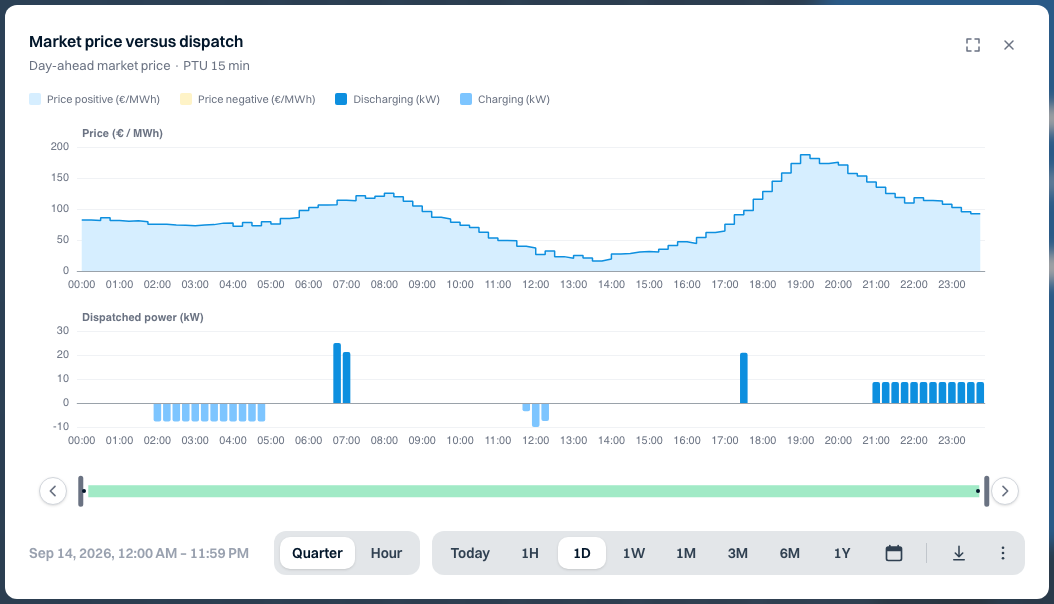
Day-ahead market price with the battery's charging and discharging below it
Trading

Does the battery charge when electricity is cheap?

See the market price next to the moments of charging and discharging.
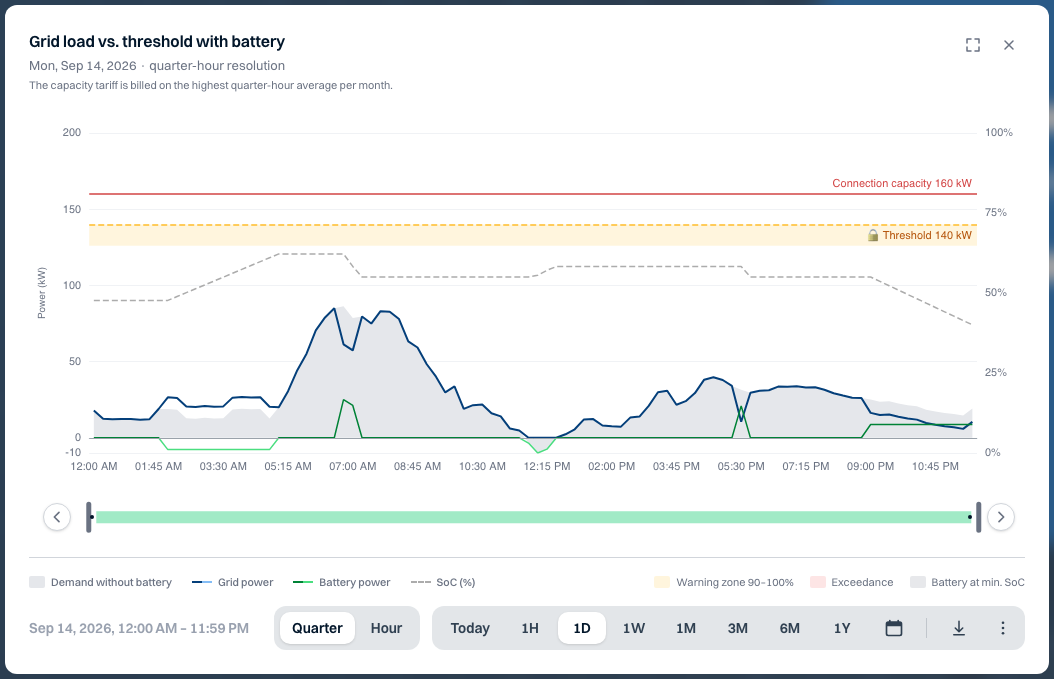
Grid power and battery power against the threshold and connection capacity
Grid connection

When do we get close to the threshold?

See the power on the connection next to your threshold, and what the battery did.
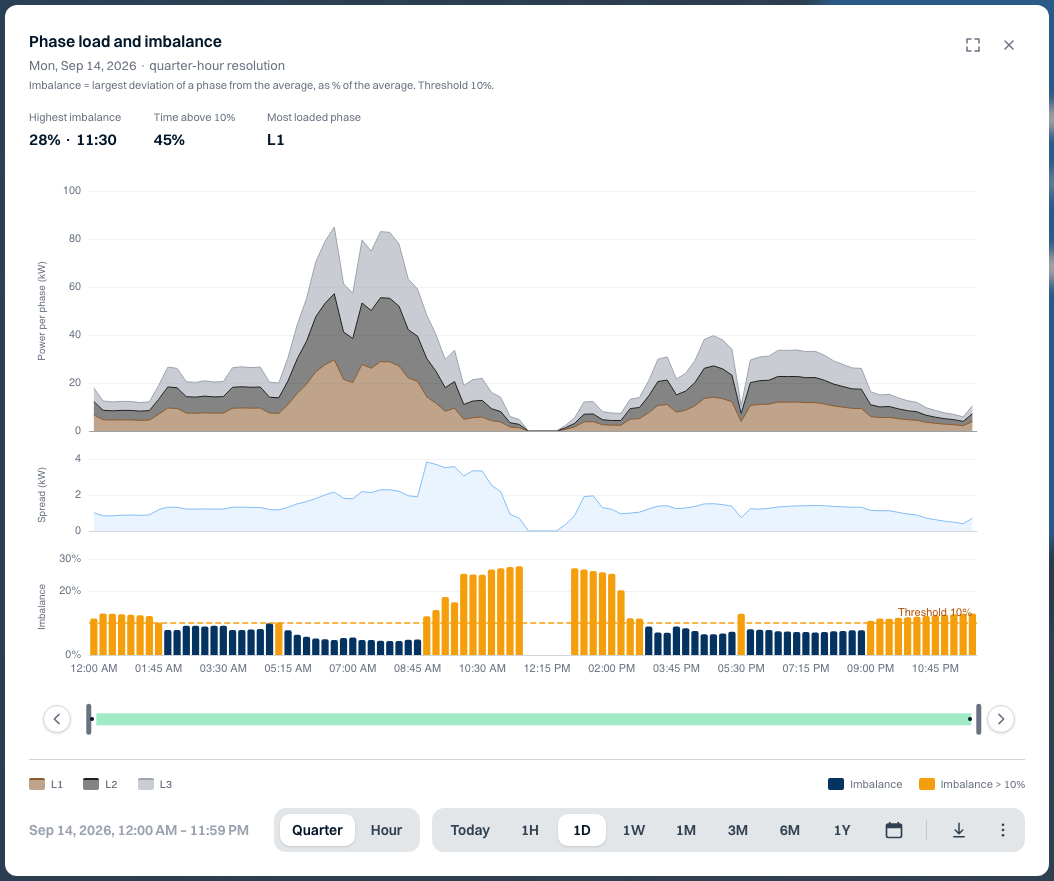
Power per phase with the imbalance against the threshold below it
Phases

Is the load evenly spread across the phases?

See the power per phase and when the imbalance went above the threshold.
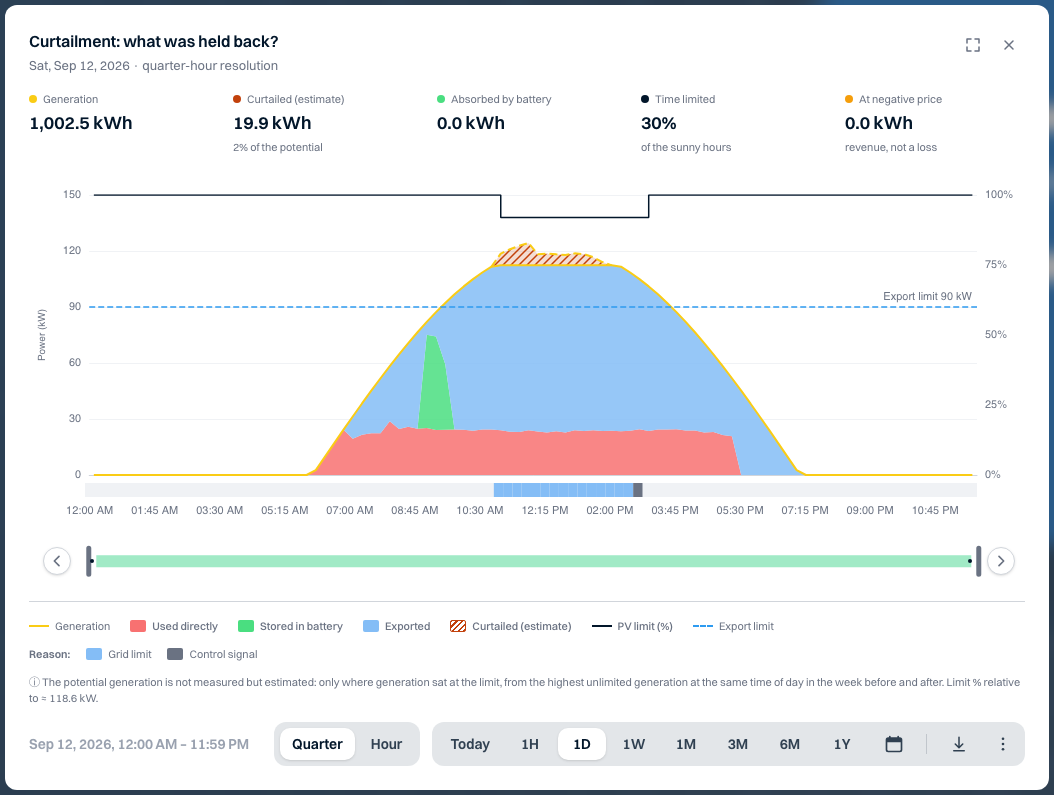
Curtailment chart with generation, feed-in, export limit and estimated curtailed energy
Solar

How much generation was held back, and why?

See when generation was limited and what caused it.
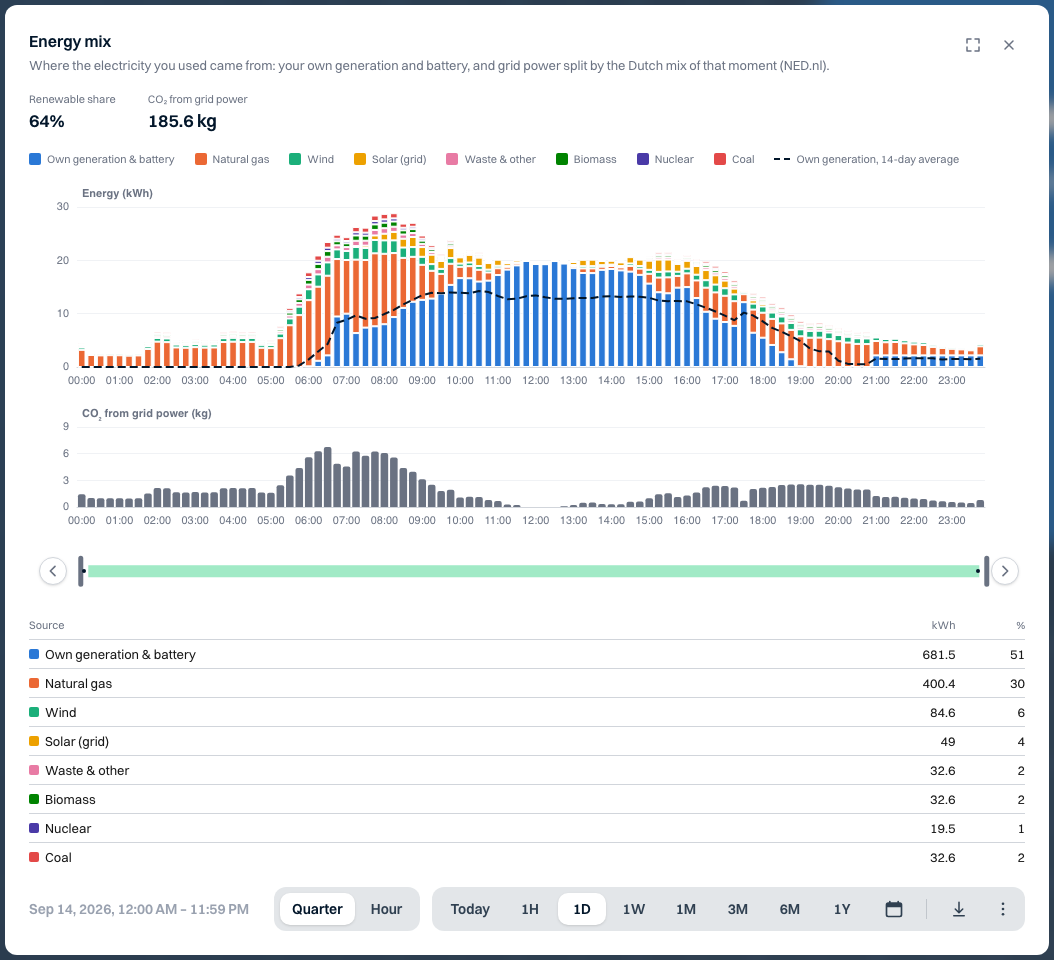
Energy mix per quarter hour with own generation and the origin of grid electricity
Energy mix

How green was the electricity we used?

See how much came from your own generation and what the grid share was made up of.
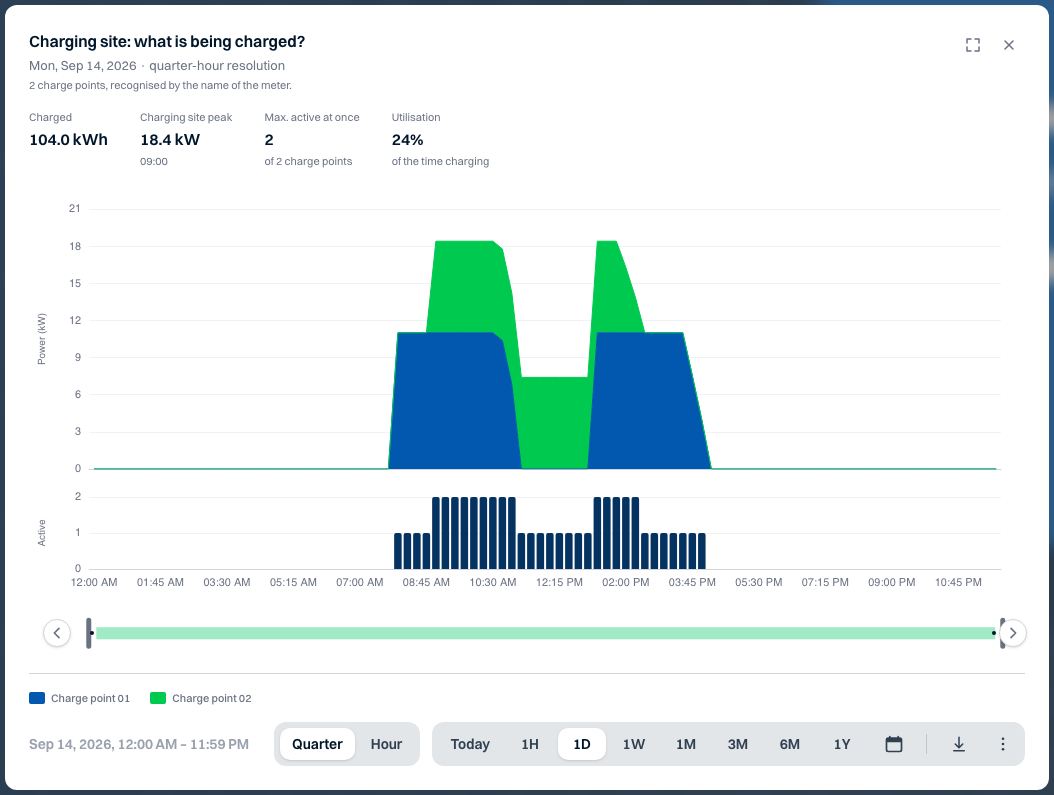
Charging power of the charging site with the number of active charge points
Charging site

Are all charge points being used?

See the total charging power and how many charge points were active at the same time.
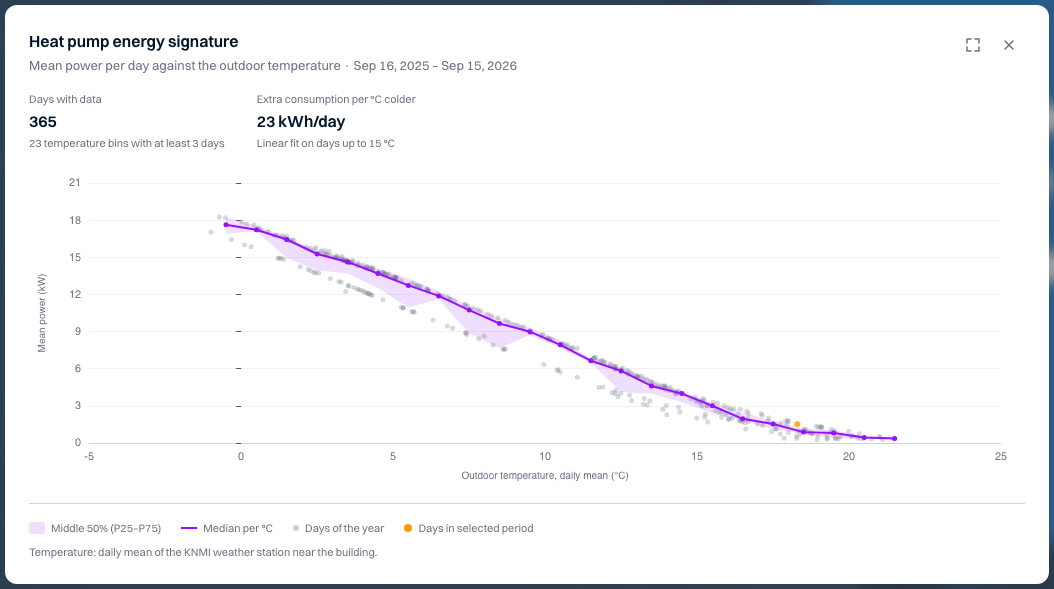
Energy signature: average power per day against the outdoor temperature
Heat pump

Does the heat pump use more than expected?

See consumption against the outdoor temperature, over a whole year.
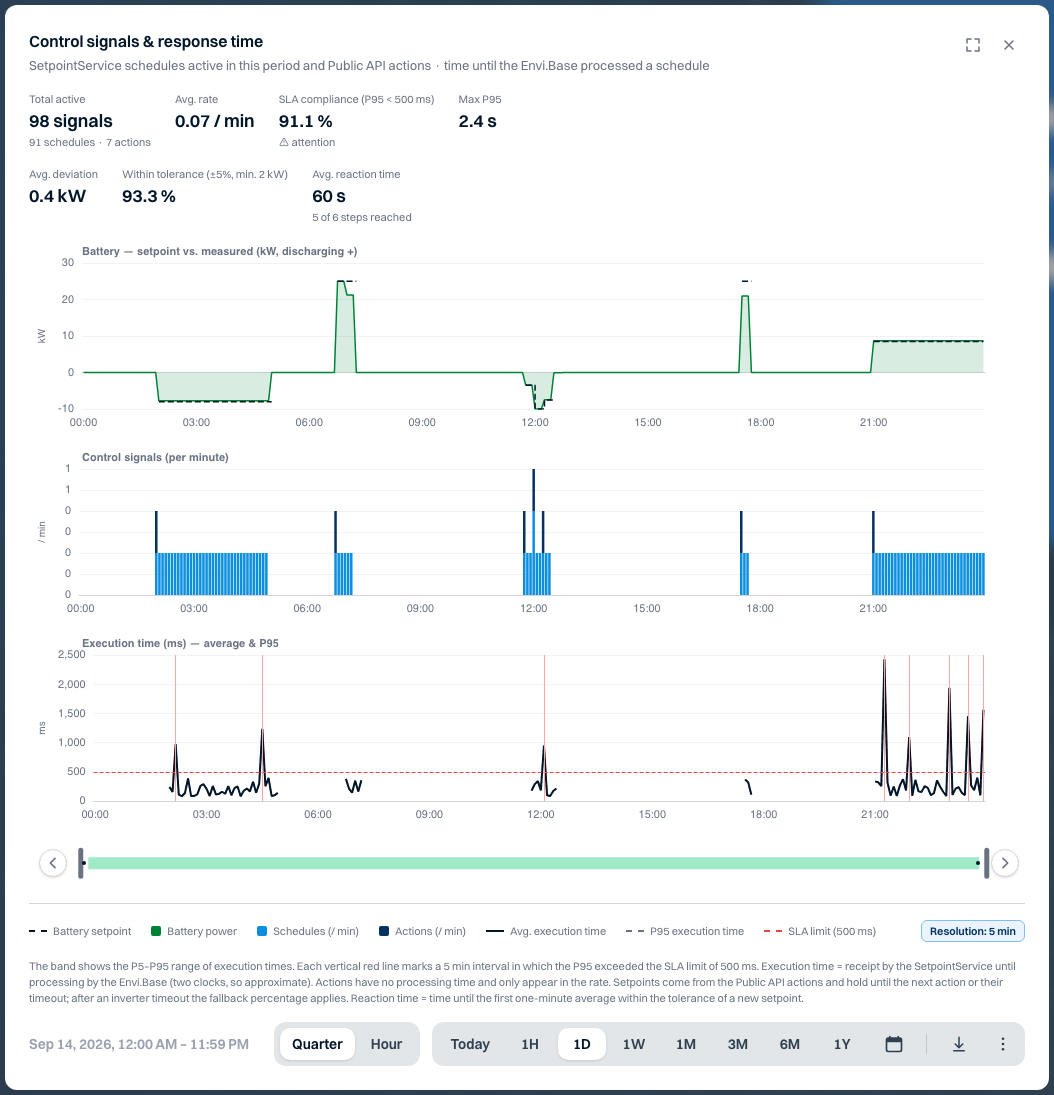
The battery's setpoint next to its measured power
Control

Does the battery follow the control signal?

See the setpoint next to the battery's measured power.

All guides

Ready to investigate for yourself?

  1. Open an installation in Watt
  2. Choose Analyses
  3. Start from a view, or build your own
Views
Energy balance onlyBattery & tradingGrid congestionSolar & curtailmentCharging siteHeat pumpSustainabilityDiagnosticsExternal control

You only see the views that fit what is connected to the installation.

More freedom in your choice of equipment with the Driver Factory

From weeks to minutes

Before
Developing a driver: weeks
Now
MinutesThe software prepares the driver, then we test it remotely on your installation together. Goal: testing within about 1 working day.

In short

For you
Choose the equipment that suits your project, even if there is no driver yet.
What you do
Request the driver under Driver requests in Watt and attach the device's register map.
Note
Early access, and aimed at devices with a Modbus interface.
01Why

No more delays because of a missing driver

As an installer you want to choose the equipment that best suits your project. If a device isn't supported by the EMSemsEnergymanagementsysteem dat energieverbruik en opwek bewaakt en optimaliseert binnen een installatie. yet, that can delay your project.

That's why we built the DriverdriverSoftwarecomponent die beschrijft hoe een apparaat werkt en communiceert, inclusief beschikbare data en commando’s. Factory. A large part of developing new driversdriverSoftwarecomponent die beschrijft hoe een apparaat werkt en communiceert, inclusief beschikbare data en commando’s. is now automated. Where this used to take weeks, the software now prepares a driverdriverSoftwarecomponent die beschrijft hoe een apparaat werkt en communiceert, inclusief beschikbare data en commando’s. within minutes.

02What does this mean for you?

Three benefits in your daily work

More freedom in equipment

You depend less on existing driversdriverSoftwarecomponent die beschrijft hoe een apparaat werkt en communiceert, inclusief beschikbare data en commando’s. and can more often use devices from different manufacturers: batteries, inverters, energy meters and chargers.

Shorter wait for connections

New driversdriverSoftwarecomponent die beschrijft hoe een apparaat werkt en communiceert, inclusief beschikbare data en commando’s. are ready for a field test much sooner.

Insight into progress

Under DriverdriverSoftwarecomponent die beschrijft hoe een apparaat werkt en communiceert, inclusief beschikbare data en commando’s. requests in Watt you request a driverdriverSoftwarecomponent die beschrijft hoe een apparaat werkt en communiceert, inclusief beschikbare data en commando’s., add documentation and follow its development.

03How does it work?

From request to working connection

  1. 01

    Request the driver

    Enter the exact model and attach the communication manual or Modbus register map for that model and firmware. A product brochure is not enough.
  2. 02

    The Driver Factory assesses and builds

    First it checks whether the device is already supported. If there is enough register information, the driver is built and tested.
  3. 03

    Follow it in Watt

    You can see which steps have been completed and the stage of your request.
  4. 04

    Test the connection

    “Driver ready” does not yet mean the device works on your installation. We plan the field test together.
How to follow your requestFor each request, Watt shows which step has been reached.
  1. SubmittedYour request and documentation have been received
  2. StartedCheck whether the device is already supported
  3. Building driverThe Driver Factory builds from the register map
  4. ValidatingThe driver is tested in software
  5. PublishingThe driver is ready for a field test

Publishing means the driver is ready, not yet that it runs on your installation.

Good to know

The automated build route is aimed at Modbus (TCP or RTU). A device that only offers another protocol is not automatically suitable. Not every request leads straight to a driverdriverSoftwarecomponent die beschrijft hoe een apparaat werkt en communiceert, inclusief beschikbare data en commando’s.: sometimes more information is needed, only reading data seems possible, or our team needs to review it. See which information you need to provide.

04Availability

Now in early access

The DriverdriverSoftwarecomponent die beschrijft hoe een apparaat werkt en communiceert, inclusief beschikbare data en commando’s. Builder is available for accounts where it has been enabled. Want to connect a new device or use the DriverdriverSoftwarecomponent die beschrijft hoe een apparaat werkt en communiceert, inclusief beschikbare data en commando’s. Builder? Get in touch and we'll discuss the options.

You choose the equipment. We help you connect it.

Read in the documentation how to submit and follow a driverdriverSoftwarecomponent die beschrijft hoe een apparaat werkt en communiceert, inclusief beschikbare data en commando’s. request.