Follow driver requests
This section is available when driverdriverSoftwarecomponent die beschrijft hoe een apparaat werkt en communiceert, inclusief beschikbare data en commando’s. requests are enabled for your account.
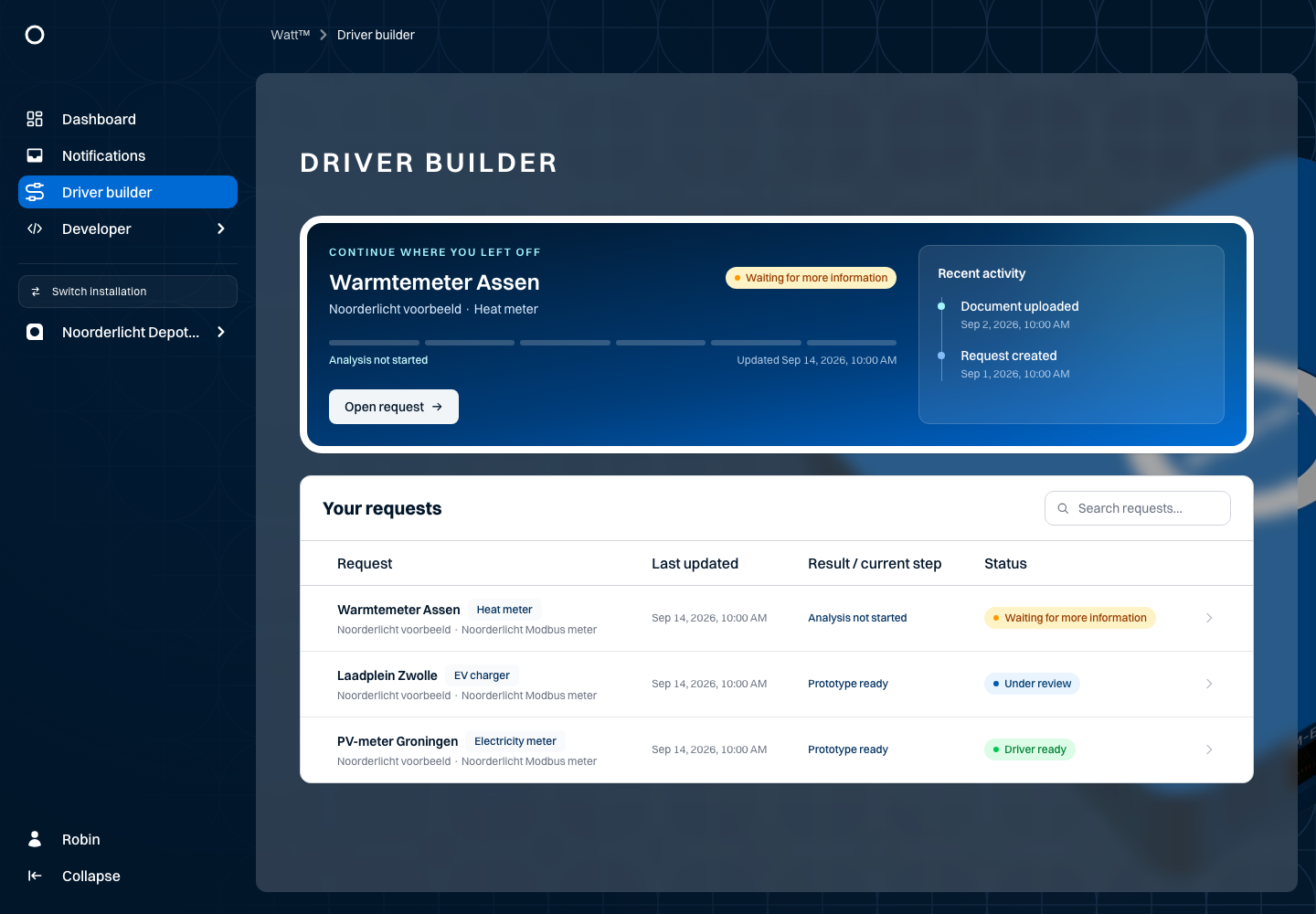
The Noorderlicht example includes requests for a heat meter in Assen, the charging yard in Zwolle and a PV meter in Groningen. Open DriverdriverSoftwarecomponent die beschrijft hoe een apparaat werkt en communiceert, inclusief beschikbare data en commando’s. requests and select a request. Check its name, manufacturer, product details and stage.
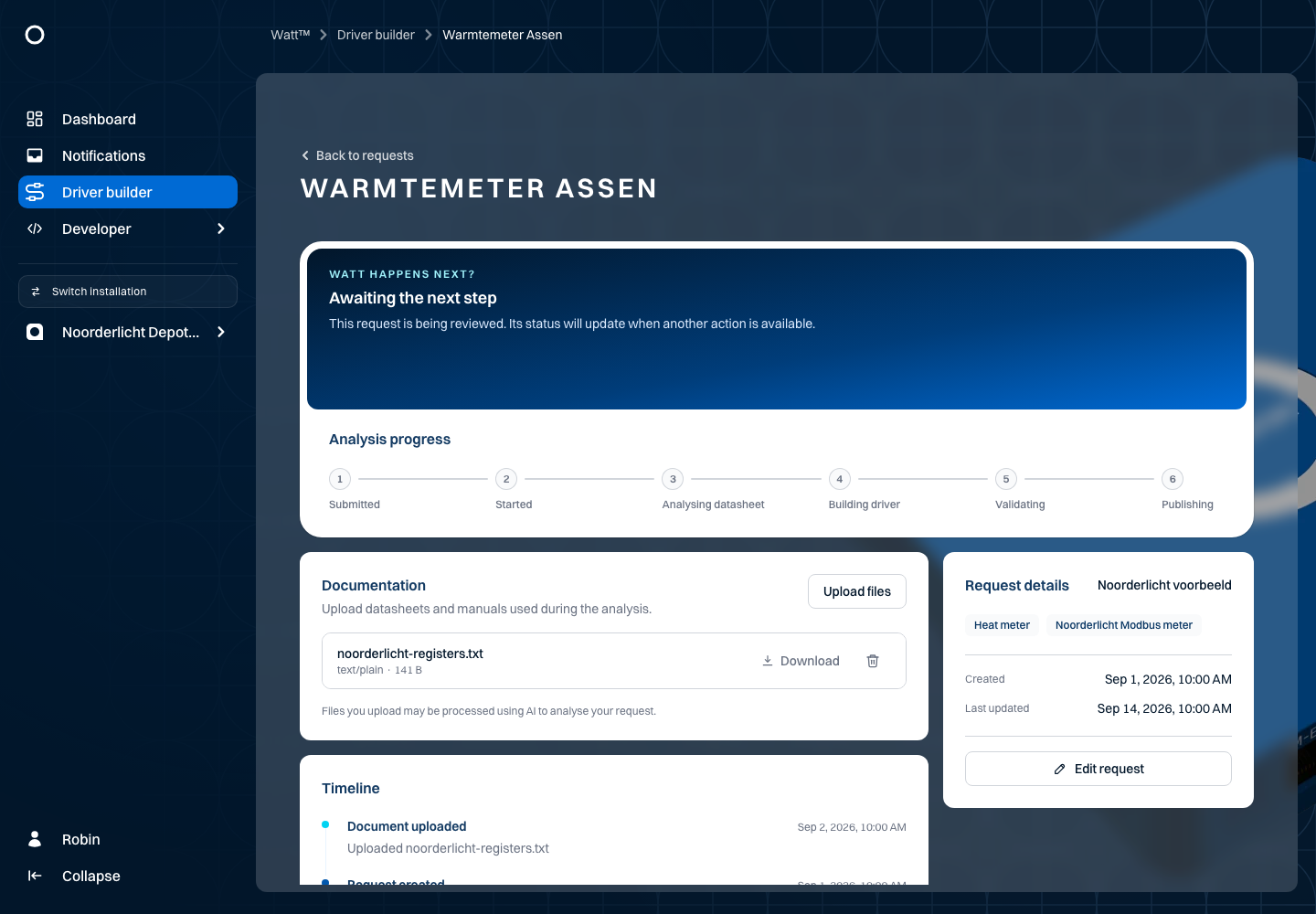
The detail view shows available documents and progress. Download a document when the download control is available. Add documentation or correct details only when your account and the request stage provide those controls.
A request's stage describes that request's progress. A completed analysis does not automatically mean a driverdriverSoftwarecomponent die beschrijft hoe een apparaat werkt en communiceert, inclusief beschikbare data en commando’s. has been installed on your physical equipment. Review the outcome and the next arrangements for your installation.
What happens to your documentation?
The driverdriverSoftwarecomponent die beschrijft hoe een apparaat werkt en communiceert, inclusief beschikbare data en commando’s. factory uses attachments to assess whether a driverdriverSoftwarecomponent die beschrijft hoe een apparaat werkt en communiceert, inclusief beschikbare data en commando’s. can be built for the specified device. The current automatic build route focuses on Modbus. A device offering only another protocol is not automatically suitable for this route. The request form has no protocol selector that enables a different build route.
Processing first checks whether the device is already supported. Otherwise, readable text is extracted from the documents and assessed for sufficient register information. Where this appears possible, the driverdriverSoftwarecomponent die beschrijft hoe een apparaat werkt en communiceert, inclusief beschikbare data en commando’s. is built and tested. Insufficient documentation may lead to a request for additional information; other outcomes include monitoring-only feasibility or a need for human review.
An accepted file is not necessarily a usable register map. A brochure stating “supports Modbus” does not explain how measurements are read. Successful software tests are not a practical test on your physical device and do not install a driverdriverSoftwarecomponent die beschrijft hoe een apparaat werkt en communiceert, inclusief beschikbare data en commando’s. at your location.
What information should you provide?
Ask the manufacturer for the communication manual or Modbus register map for your exact product and firmwarefirmwareSoftware die op de Envi.Base draait, inclusief drivers en regelingen.. A short note of your own is useful, but does not replace technical manufacturer documentation. Attach important explanations as documents too: the build route receives request details and attachments, not a free-form technical instruction field.
| Topic | What to include | Why it matters |
|---|---|---|
| Device identity | Manufacturer, exact model, product variants, firmwarefirmwareSoftware die op de Envi.Base draait, inclusief drivers en regelingen. and manual revision/date. | A related model may use different addresses or meanings. |
| Connection | Modbus TCP or RTU, relevant communication settings and how the unit/slaveslaveEen apparaat dat reageert op commando’s van de master. Elk apparaat heeft een uniek adres (ID). ID is configured. | This helps assess the connection; do not share real access credentials. |
| Register table | Measurement, register address, function code, register count and read/write access. | A name such as “energy” without an address and read method is insufficient. |
| Address notation | Decimal or hexadecimal, address base/offset and whether the table numbers bytes or registers. | An off-by-one address or the wrong interpretation can shift every value. |
| Data format | Data type, signed/unsigned, length and byte/word order. | A 32-bit value does not have the same register layout as a 16-bit value. |
| Units and conversion | Unit, scale factor, separate scale-factor registers if applicable, and sign convention. | This prevents confusing import with export or a raw value with a measurement. |
| Special values | Invalid values, status/fault codes, missing measurements and counter reset/overflow behaviour. | These should not silently become ordinary measurements. |
| Evidence and exceptions | Example messages, relevant footnotes and product/firmwarefirmwareSoftware die op de Envi.Base draait, inclusief drivers en regelingen. differences. | Meaning and addressing may be explained outside the register row itself. |
Keep tables, column headings and related footnotes together. Include a multi-page document in full when a later page explains an earlier table. Do not fill in missing register addresses or scale factors from assumptions.
When control is required
Control required means more than reading measurements. Select it only when you actually need control and provide the corresponding write instructions. Include:
- Write registers and function codes for the required commands, with data types and units.
- Permitted minimum/maximum values, valid enum values and the meaning of a negative setpoint.
- Required remote/EMSemsEnergymanagementsysteem dat energieverbruik en opwek bewaakt en optimaliseert binnen een installatie. mode, enable or start/stop registers, and the order of prerequisites.
- Documented time-outs, watchdogs, feedback and connection-loss behaviour where applicable.
A power register is not enough if the device ignores commands until a separate control mode is enabled. Conversely, a heat meter that only provides measurements is not necessarily unsuitable: a monitoring driverdriverSoftwarecomponent die beschrijft hoe een apparaat werkt en communiceert, inclusief beschikbare data en commando’s. may fit a read-only use case. The outcome depends on the request and documentation, not just the checkbox.
Example: preparing the Assen heat meter request
The example request Warmtemeter Assen is for reading heat measurements, not controlling the device. Control required is therefore off. Its example attachment is not a real manufacturer register map and must not be used with hardware.
Attach the register map for the exact model to your request. Use this outline for an additional note:
Purpose: read heat measurements for the Assen installation.
Manufacturer and exact model: [as stated on device and manufacturer documents]
Firmware / document revision: [version and date]
Connection: [Modbus TCP or RTU, with relevant settings]
Required measurements: [only values documented for this device]
Source per measurement: [file, page/table and register row]
Address notation and data type: [from the register map]
Unit, scale factor and word order: [with source reference]
Control needed: no; read-only monitoring.
Missing or uncertain: [state explicitly and ask the manufacturer]
The brackets are completion prompts, not register data. For the charging-yard request, include the documented control prerequisites when control is needed. Do not copy heat-meter data into an EV charger or inverter request.
Add and check files
Where the controls are available, use Upload files or drop files onto Documentation. Check the document list afterwards: files are uploaded individually, so some may succeed while another is rejected. Download an attachment if needed to confirm the correct file was added.
Watt accepts PDF and the listed common image formats, DOCX, modern Excel files, text/table files and certain email/web formats. Legacy .doc, .xls and ZIP are not supported inputs. Each file may be up to 50 MiB (52,428,800 bytes). Renaming an extension does not convert the file. Email attachments are not automatically read as separate register documents: upload those relevant files separately too.
Use clearly readable originals. For scans, check that small numbers, symbols and table columns are legible; text recognition does not guarantee correct processing of an unreadable table. Avoid files whose technical content exists only behind external links or in embedded images that are not extracted. Supply only documentation you are entitled to share. As the screen states, attachments may be processed with AI; remove unnecessary personal information and secrets.
Documentation may be locked after successful processing, preserving the documents on which the outcome was based. If upload or removal controls are missing, check the stage and arrange necessary corrections with the request administrator.
Follow up on the outcome
When Waiting for more information is shown, collect the missing technical details instead of resending the same incomplete attachment. For In queue or In progress, follow progress; another request for the same model does not automatically speed up the existing one. Under review requires further assessment. DriverdriverSoftwarecomponent die beschrijft hoe een apparaat werkt en communiceert, inclusief beschikbare data en commando’s. ready or Accepted does not mean your installation's device has already been connected and tested.
Use the stage, timeline and available outcome to agree on the next step. Reports and technical administration links are not visible to every account. Arrange installation, configuration and a practical test with the responsible administrator; this request page does not control devices.