Installation of the Envi.Base
The step-by-step guide below assumes delivery of a standalone Envi.Baseenvi.baseDe energiecontroller van Envitron die apparaten uitleest, aanstuurt en data opslaat achter de hoofdaansluiting. in a box. However, the Envi.Baseenvi.baseDe energiecontroller van Envitron die apparaten uitleest, aanstuurt en data opslaat achter de hoofdaansluiting. can also be delivered pre-mounted in an installation cabinet. View the available options at Envi.Baseenvi.baseDe energiecontroller van Envitron die apparaten uitleest, aanstuurt en data opslaat achter de hoofdaansluiting. in installation cabinet.
Preparation
Before installation, verify that all required components are present and undamaged. The included and optional components can be found at Contents of box.
Required tools
- Torx T10 screwdriver – for the mounting screws
- 5 mm masonry drill bit – for the included concrete anchors
- Phillips PZ2 screwdriver – for securing DIN rail clamps
- Marking tool
Mounting the Envi.Base
The Envi.Baseenvi.baseDe energiecontroller van Envitron die apparaten uitleest, aanstuurt en data opslaat achter de hoofdaansluiting. must be installed in a clean and dry environment. If this is not possible, the controller must be mounted in a suitable enclosure. Envitron optionally supplies the Envi.Baseenvi.baseDe energiecontroller van Envitron die apparaten uitleest, aanstuurt en data opslaat achter de hoofdaansluiting. in an IP65 installation cabinet, suitable for harsh or humid environments.
Mounting options
- Hanging with screws
- Mounting with DIN rail clamps
Mounting on a wooden or concrete wall
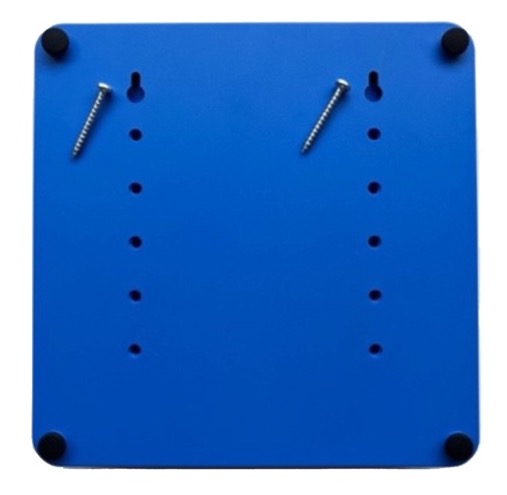
The Envi.Baseenvi.baseDe energiecontroller van Envitron die apparaten uitleest, aanstuurt en data opslaat achter de hoofdaansluiting. has two keyhole slots on the back into which 3 mm screws can be hooked (included). The cardboard inlay in the packaging contains a 2D drawing showing the exact positions of these screw holes.
Wooden wall
The two included Torx screws can be driven directly into the wood using a T10 screwdriver. Make sure the screws are inserted straight and leave approximately 4 mm of thread visible. The Envi.Baseenvi.baseDe energiecontroller van Envitron die apparaten uitleest, aanstuurt en data opslaat achter de hoofdaansluiting. can now be hung over the screws.
Concrete wall
Using a 5 mm masonry drill bit, drill two holes approximately 30 mm deep and insert the included 5×25 mm concrete anchors. Push the anchors flush with the wall (using a hammer if necessary), then drive in the Torx T10 screws and leave approximately 4 mm of thread visible. Hang the Envi.Baseenvi.baseDe energiecontroller van Envitron die apparaten uitleest, aanstuurt en data opslaat achter de hoofdaansluiting. over the screws.
Mounting in a control cabinet
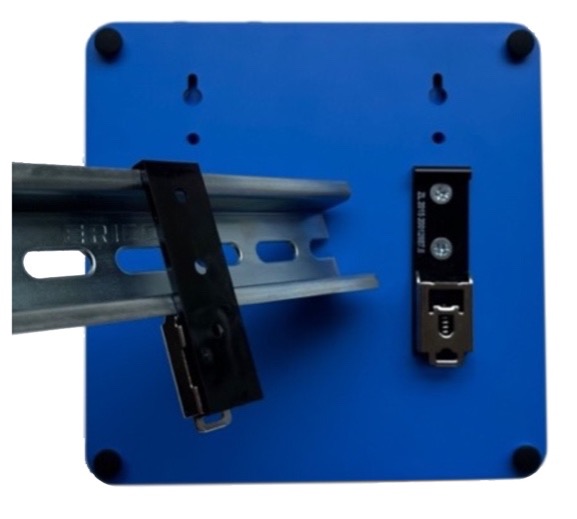
On the back of the Envi.Baseenvi.baseDe energiecontroller van Envitron die apparaten uitleest, aanstuurt en data opslaat achter de hoofdaansluiting. there are screw holes for attaching two DIN rail clamps. Mount both clamps at equal height. Then click the Envi.Baseenvi.baseDe energiecontroller van Envitron die apparaten uitleest, aanstuurt en data opslaat achter de hoofdaansluiting. into the rail at the top and press it firmly until it clicks into place.
Connecting the power supply
Connect the power adapter to the DC connector of the Envi.Baseenvi.baseDe energiecontroller van Envitron die apparaten uitleest, aanstuurt en data opslaat achter de hoofdaansluiting. and plug the adapter into a power outlet. The LED ring lights up as soon as the device receives power.
When installing the Envi.Baseenvi.baseDe energiecontroller van Envitron die apparaten uitleest, aanstuurt en data opslaat achter de hoofdaansluiting. in control cabinets, it may be desirable to connect the Envi.Baseenvi.baseDe energiecontroller van Envitron die apparaten uitleest, aanstuurt en data opslaat achter de hoofdaansluiting. directly to a DC power supply instead of a power outlet. For this purpose, Envitron optionally offers a power converter with a separate DC cable.
Ensure that the power supply remains within the voltage range of 12–24 V DC. For the DC connection cable optionally supplied by Envitron, blue is (−) and brown is (+).
Network connection
The Envi.Baseenvi.baseDe energiecontroller van Envitron die apparaten uitleest, aanstuurt en data opslaat achter de hoofdaansluiting. uses a mobile data connection by default via the integrated 4G modem with SIM card. In environments with limited network coverage, an external antenna can be connected for better reception. Envitron supplies this optionally. See the optional accessories at Contents of box.
See Network connection for a detailed explanation of the network connection and configuration.
Connecting devices
Connect the desired devices to the Envi.Baseenvi.baseDe energiecontroller van Envitron die apparaten uitleest, aanstuurt en data opslaat achter de hoofdaansluiting.. At connecting devices each communication interface is explained in detail regarding how devices should be connected to the Envi.Baseenvi.baseDe energiecontroller van Envitron die apparaten uitleest, aanstuurt en data opslaat achter de hoofdaansluiting..
The manual of the device in question always takes precedence.
Supported communication protocols
- Pulse (I/O)
- Modbus RTU (RS485)
- Modbus TCP/IP (Ethernet)
- M-Bus
- P1 port of smart meters
- MQTT
- BACnet
- IEC 60870-5-104 (IEC 104)
The Envi.Baseenvi.baseDe energiecontroller van Envitron die apparaten uitleest, aanstuurt en data opslaat achter de hoofdaansluiting. supports all types of pulse meters and P1 meters by default. For other protocols, such as Modbus and M-Bus, it is important that the device in question is supported in the firmwarefirmwareSoftware die op de Envi.Base draait, inclusief drivers en regelingen. library. Every brand and type of device requires its own driverdriverSoftwarecomponent die beschrijft hoe een apparaat werkt en communiceert, inclusief beschikbare data en commando’s. to read the registers correctly. Envitron continuously expands this firmwarefirmwareSoftware die op de Envi.Base draait, inclusief drivers en regelingen. library with new devices. Check in advance at supported devices whether the desired device is already supported.
When the connection needs to be monitored for contracted capacity or fuse rating, it is essential that the meter and the devices to be controlled are connected to the same Envi.Baseenvi.baseDe energiecontroller van Envitron die apparaten uitleest, aanstuurt en data opslaat achter de hoofdaansluiting..
Configuring the Envi.Base
Before devices can be configured, the Envi.Baseenvi.baseDe energiecontroller van Envitron die apparaten uitleest, aanstuurt en data opslaat achter de hoofdaansluiting. must first be registered under a building in the Envi.Cloud. A building is prepared by Envitron in the installation tool once the order has been approved. Multiple Envi.Basesenvi.baseDe energiecontroller van Envitron die apparaten uitleest, aanstuurt en data opslaat achter de hoofdaansluiting. can be linked to a single building.
Login credentials for the installation tool can be obtained from the sales department.
Scan the QR code on the Envi.Baseenvi.baseDe energiecontroller van Envitron die apparaten uitleest, aanstuurt en data opslaat achter de hoofdaansluiting. to log in to Envitron's installation tool. This tool is also accessible via install.envitron.nl.
After logging in, the Envi.Baseenvi.baseDe energiecontroller van Envitron die apparaten uitleest, aanstuurt en data opslaat achter de hoofdaansluiting. can be linked to the correct building, after which the connected devices can be configured. The installation tool guides you through the process step by step. For additional explanation, see Configuration.
After a successful configuration, the provided login credentials can be used to access the Envi.API, the Envi.Portal, or the Envi.App.
If you have questions or encounter issues during installation, you can contact the support team at support@envitron.com. If you do not have access to Envi.Install, our support department can complete the configuration. To do so, send an email with the details listed below and we will finalize the setup.
Required information:
- Name of the building
- Address details
- Serial number of the Envi.Baseenvi.baseDe energiecontroller van Envitron die apparaten uitleest, aanstuurt en data opslaat achter de hoofdaansluiting.
- Name or function of each connected device
- Port or address to which the device is connected