Connecting alarm contacts
Introduction
The Envi.Baseenvi.baseDe energiecontroller van Envitron die apparaten uitleest, aanstuurt en data opslaat achter de hoofdaansluiting. can detect the operating state of the installation via an alarm contact (for example from a generator, ATS, or fire alarm panel). This is necessary when the Envi.Baseenvi.baseDe energiecontroller van Envitron die apparaten uitleest, aanstuurt en data opslaat achter de hoofdaansluiting. must immediately switch off the connected production systems (for example solar panels or batteries), such as in the event of a fire or when the installation switches to emergency power operation.
This signal can be connected to a pulse contact of the Envi.Baseenvi.baseDe energiecontroller van Envitron die apparaten uitleest, aanstuurt en data opslaat achter de hoofdaansluiting.. This allows the controller to safely switch to safe mode as soon as the contact is opened.
Pulse devices and alarm contacts can be used simultaneously. The function of each alarm contact can be configured individually in the Envi.Baseenvi.baseDe energiecontroller van Envitron die apparaten uitleest, aanstuurt en data opslaat achter de hoofdaansluiting..
Connecting alarm contacts
An alarm contact for operating state detection is connected to the pulse contact (S0) of the Envi.Baseenvi.baseDe energiecontroller van Envitron die apparaten uitleest, aanstuurt en data opslaat achter de hoofdaansluiting.. This contact must be closed (NC) under normal operating conditions, so that a fault is also detected in the event of a cable break.
When the installation switches to emergency power, or when a fire is detected, the contact opens and the Envi.Baseenvi.baseDe energiecontroller van Envitron die apparaten uitleest, aanstuurt en data opslaat achter de hoofdaansluiting. automatically switches off all connected devices.
For direct connection, an optional 2-metre RJ12 cable is supplied, fitted with ferrules on one side. You can also choose to make this cable yourself. For more information, see the Data connections page.
When the Envi.Baseenvi.baseDe energiecontroller van Envitron die apparaten uitleest, aanstuurt en data opslaat achter de hoofdaansluiting. is ordered as a complete installation cabinet, the communication ports are already externally looped through to terminal blocks. No special cables need to be made in that case. Also see Installation cabinets for more information.
Pin configuration pulse ports
| Pulse port 1 (10) | |
|---|---|
| Pin 1 (–) and 2 (+) | Signal source 1 |
| Pin 3 (–) and 4 (+) | Signal source 2 |
| Pin 5 (–) and 6 (+) | Signal source 3 |
| Pulse port 2 (11) | |
|---|---|
| Pin 1 (–) and 2 (+) | Signal source 4 |
| Pin 3 (–) and 4 (+) | Signal source 5 |
| Pin 5 (–) and 6 (+) | Signal source 6 |
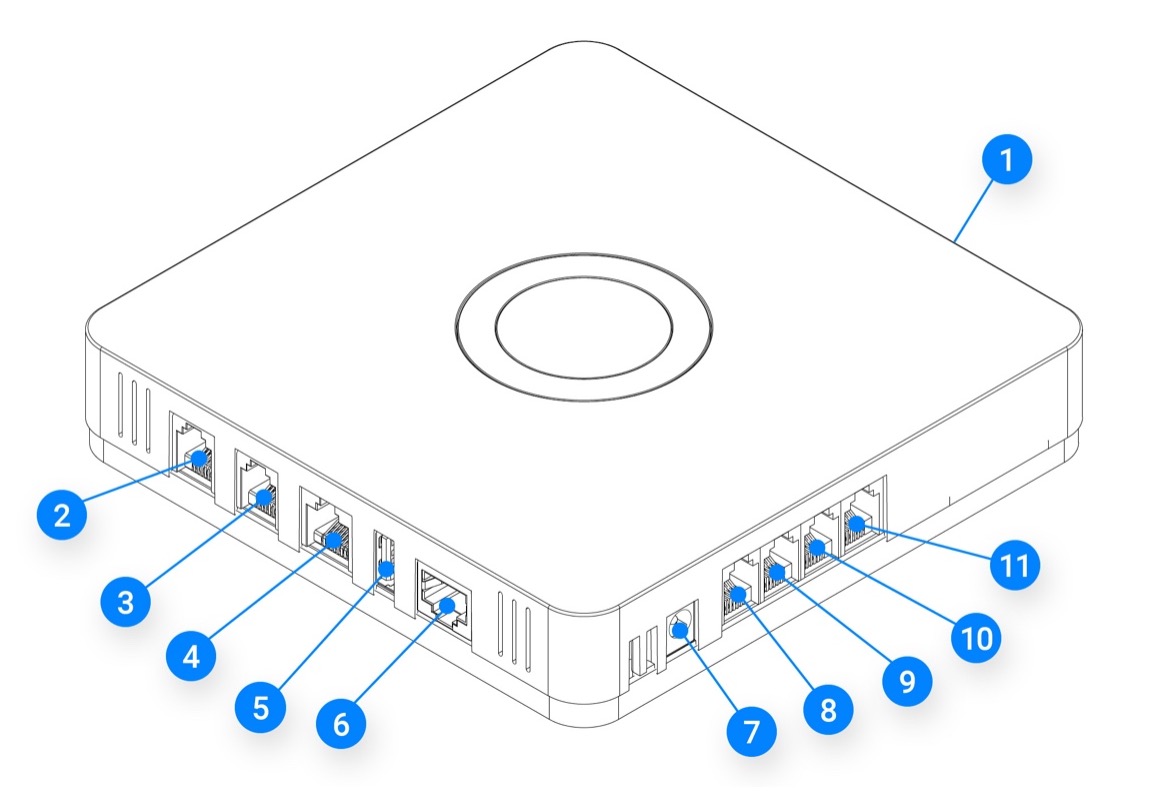
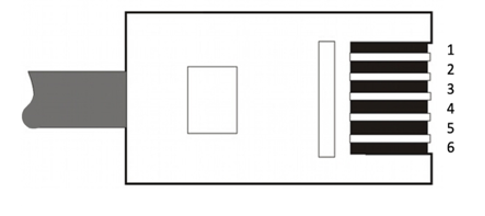
All minus (–) pins are internally connected to each other.
Configuration
Once the alarm contacts are correctly connected, they can be configured in the Envi.Baseenvi.baseDe energiecontroller van Envitron die apparaten uitleest, aanstuurt en data opslaat achter de hoofdaansluiting.. This is performed by a support engineer from Envitron.
After configuration, it is important to always test the signalling to ensure that the installation is correctly switched off in emergency situations.