Connecting Pulse (S0) devices
Introduction
Devices that emit pulses can be connected to the pulse ports of the Envi.Baseenvi.baseDe energiecontroller van Envitron die apparaten uitleest, aanstuurt en data opslaat achter de hoofdaansluiting.. These include, for example, water meters, gas meters, or heat and electricity meters with a pulse signal. For each measured quantity of energy, the meter briefly closes a contact, which the Envi.Baseenvi.baseDe energiecontroller van Envitron die apparaten uitleest, aanstuurt en data opslaat achter de hoofdaansluiting. registers as one pulse.
Other signal sources can also be connected to the pulse ports of the Envi.Baseenvi.baseDe energiecontroller van Envitron die apparaten uitleest, aanstuurt en data opslaat achter de hoofdaansluiting., such as a fire alarm contact via the fire alarm panel or a generator alarm contact. This can be used, for example, to put the Envi.Baseenvi.baseDe energiecontroller van Envitron die apparaten uitleest, aanstuurt en data opslaat achter de hoofdaansluiting. into safe mode so that all connected devices are switched off. Go to Signal contact for this purpose.
Connecting pulse devices
For directly connecting pulse devices to the Envi.Baseenvi.baseDe energiecontroller van Envitron die apparaten uitleest, aanstuurt en data opslaat achter de hoofdaansluiting., an optional 2-metre RJ12 cable is supplied, fitted with ferrules on one side. You can also choose to make this cable yourself. See the Data connections page for more information.
Each pulse device must be connected to its own pulse contact on the Envi.Baseenvi.baseDe energiecontroller van Envitron die apparaten uitleest, aanstuurt en data opslaat achter de hoofdaansluiting.; see the table below. This means one device per pulse contact can be connected. Please ensure that the polarity (+ and –) is connected correctly; not all pulse contacts are potential-free.
When the Envi.Baseenvi.baseDe energiecontroller van Envitron die apparaten uitleest, aanstuurt en data opslaat achter de hoofdaansluiting. is ordered as a complete installation cabinet, the communication ports are already externally looped through to terminal blocks. No special cables need to be made in that case. Also see Installation cabinets for more information.
Pin configuration of pulse ports
| Pulse port 1 (10) | |
|---|---|
| Pin 1 (–) and 2 (+) | Pulse source 1 |
| Pin 3 (–) and 4 (+) | Pulse source 2 |
| Pin 5 (–) and 6 (+) | Pulse source 3 |
| Pulse port 2 (11) | |
|---|---|
| Pin 1 (–) and 2 (+) | Pulse source 4 |
| Pin 3 (–) and 4 (+) | Pulse source 5 |
| Pin 5 (–) and 6 (+) | Pulse source 6 |
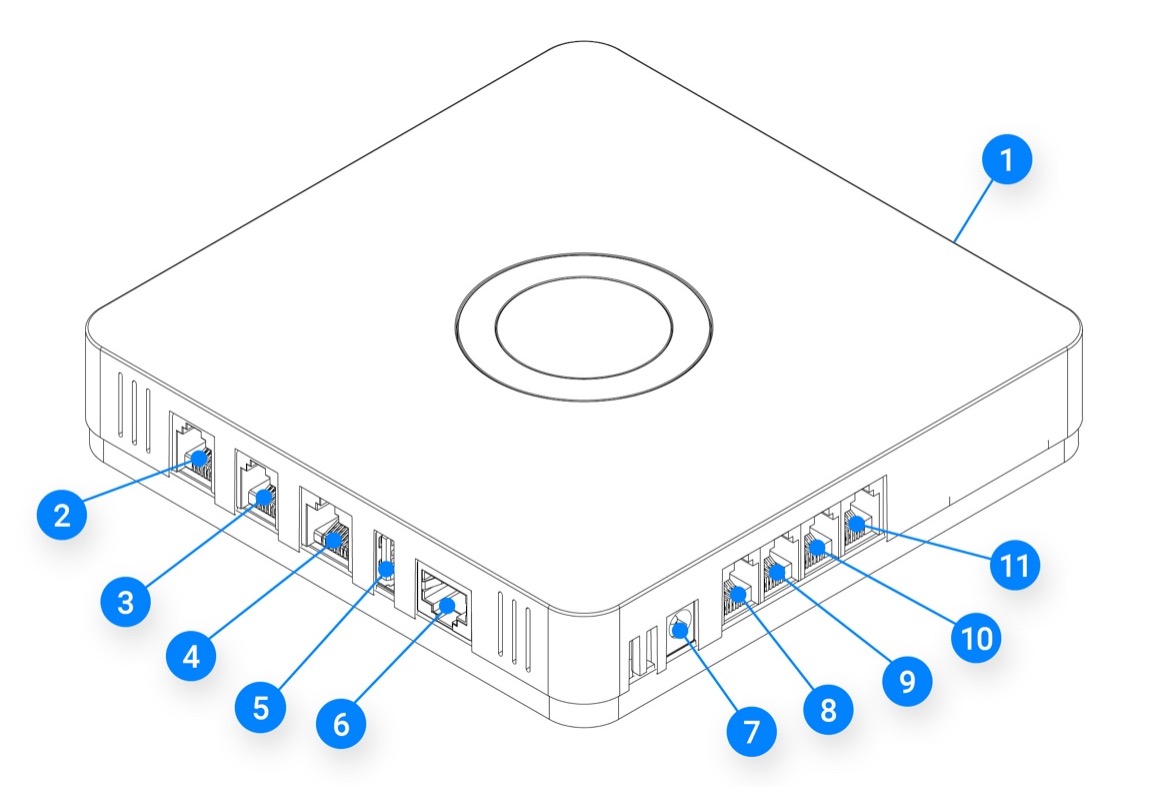
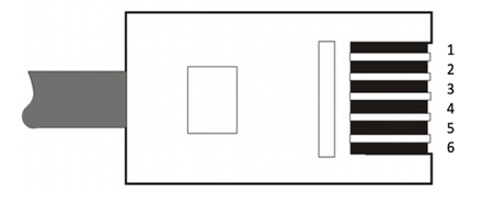
All minus (–) pins are internally connected to each other.
Configuration
After connecting, the devices must be configured individually according to the manufacturer's instructions. It is important to specify on the device itself how many pulses per unit of energy (pulse ratio) are emitted. For a gas meter, this is for example the number of pulses per m³, and for an electricity meter the number of pulses per kWh. If this cannot be set on the device, consult the nameplate or the manual for the pulse ratio.
Many energy meters have a pulse LED with a specified ratio (for example 1000 imp/kWh). This often applies only to the LED and not to the physical pulse contact. Always consult the meter's manual or settings to confirm the correct pulse ratio.
Once the devices are functioning correctly, they can be configured in the Envi.Baseenvi.baseDe energiecontroller van Envitron die apparaten uitleest, aanstuurt en data opslaat achter de hoofdaansluiting.. Always test whether the signal is being received by the Envi.Baseenvi.baseDe energiecontroller van Envitron die apparaten uitleest, aanstuurt en data opslaat achter de hoofdaansluiting. by simulating a pulse.
Technical specifications
| Technical specifications | |
|---|---|
| Recommended signal cable | 2 × 0.8 mm² — shielding not required |
| Maximum number of devices | 6 devices (3 per pulse port) |
| Maximum cable length | 60 metres |
| Shortest detectable pulse width | 20 ms |
| Minimum interval between pulses | 100 ms |
How pulse communication works
Pulse is a simple but relatively error-prone communication system. The meter does not transmit an actual meter reading, only pulses. If the connection between the meter and the Envi.Baseenvi.baseDe energiecontroller van Envitron die apparaten uitleest, aanstuurt en data opslaat achter de hoofdaansluiting. is temporarily lost (for example due to a cable break or power failure), the pulses generated during that period will not be registered. This lost data cannot be recovered afterwards.
A pulse contact is essentially a make contact (switch). Once a certain amount of energy has passed through the meter, the pulse contact is briefly closed by an internal mechanism. The Envi.Baseenvi.baseDe energiecontroller van Envitron die apparaten uitleest, aanstuurt en data opslaat achter de hoofdaansluiting. registers this closure as one pulse.
Example: A gas meter with a pulse output has a rotor that mechanically closes a switch with each revolution of the counter. A voltage of approximately 3 V DC is present on the pulse connection of the Envi.Baseenvi.baseDe energiecontroller van Envitron die apparaten uitleest, aanstuurt en data opslaat achter de hoofdaansluiting. (– on one pin, + on the other). When the meter closes the contact, a brief connection or closure is made, causing the input of the Envi.Baseenvi.baseDe energiecontroller van Envitron die apparaten uitleest, aanstuurt en data opslaat achter de hoofdaansluiting. to go "high" and the pulse to be counted.
With electronic meters the same happens, but using a relay controlled by the counter. Each closure of the contact is registered by the Envi.Baseenvi.baseDe energiecontroller van Envitron die apparaten uitleest, aanstuurt en data opslaat achter de hoofdaansluiting. and converted to a quantity of energy, for example:
- For Gas:
- For Electricity:
The exact amount of energy per pulse is called the pulse ratio. This value is stated on the meter and must be entered in Envi.Cloud so that the measurements are displayed correctly. The pulse ratio can differ per meter; always check this carefully.