Connecting TCP/IP Modbus devices
Introduction
Modbus TCP/IP is the network variant of Modbus RTU. Instead of a serial cable, communication runs via Ethernet and IP addresses. This allows Modbus TCP devices to be easily connected to the existing data network and read out directly by the Envi.Baseenvi.baseDe energiecontroller van Envitron die apparaten uitleest, aanstuurt en data opslaat achter de hoofdaansluiting..
Connecting Modbus TCP/IP devices
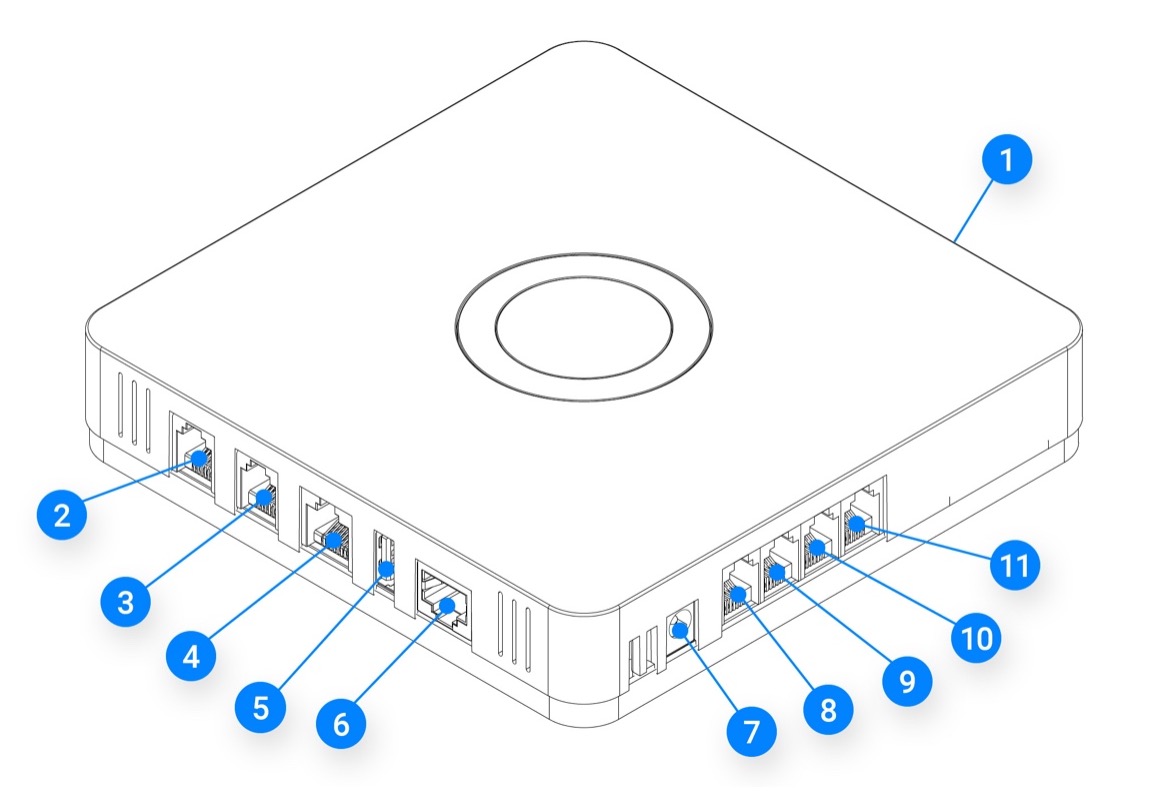
Connect the LANlanLokaal (bedrijfs)netwerk binnen een gebouw of terrein. port (port 6) of the Envi.Baseenvi.baseDe energiecontroller van Envitron die apparaten uitleest, aanstuurt en data opslaat achter de hoofdaansluiting. to the data network via the nearest router or switch. Connect the Modbus TCP/IP devices to the same network. This way they can find each other directly and the Envi.Baseenvi.baseDe energiecontroller van Envitron die apparaten uitleest, aanstuurt en data opslaat achter de hoofdaansluiting. can read out the devices.
Many Modbus TCP devices can also be used as a gateway. The device communicates via TCP with the Envi.Baseenvi.baseDe energiecontroller van Envitron die apparaten uitleest, aanstuurt en data opslaat achter de hoofdaansluiting., but connects via its RS485 port to multiple Modbus RTU devices. Examples include a Waveshare RTU/TCP converter or a Janitza UMG kWh meter. Please refer to the manual of the relevant device for more information.
The underlying RTU devices must each be assigned a unique RTU address. During configuration in the Envi.Baseenvi.baseDe energiecontroller van Envitron die apparaten uitleest, aanstuurt en data opslaat achter de hoofdaansluiting., these addresses are linked to the IP address of the TCP device, so that all underlying devices are automatically reachable and readable.
Configuration
After connecting, the Modbus TCP/IP devices must be individually configured according to the manufacturer's manual. Each device must be assigned a unique, static IP address within the network. This ensures the device remains always discoverable, even when the network changes or is restarted.
Once the devices are correctly configured, they can be added to the Envi.Baseenvi.baseDe energiecontroller van Envitron die apparaten uitleest, aanstuurt en data opslaat achter de hoofdaansluiting. via the Envitron installation tool. In the tool, create the relevant device under the appropriate category and enter the IP address and TCP port (default: 502). Give the device a clear name; this name will also appear in the portal.
Then test in the installation tool whether the measurement values are being read out correctly. If the device is a controllable device, verify with a brief control signal that the device responds correctly.
Technical specifications
| Property | Specification |
|---|---|
| Recommended network cable | Cat6 or higher (RJ45 connector) |
| Envi.Baseenvi.baseDe energiecontroller van Envitron die apparaten uitleest, aanstuurt en data opslaat achter de hoofdaansluiting. connection | LANlanLokaal (bedrijfs)netwerk binnen een gebouw of terrein. port (port 6) |
| IP addressing | Unique, static IP addresses for all Modbus TCP/IP devices |
| Maximum number of devices | Recommended: up to ±32 Modbus devices for stable operation |
| Default Modbus TCP port | 502 |
| Network structure | Works on any standard IP network; supports gateways to Modbus RTU |
Troubleshooting connection issues
Is a device not coming online on the Envi.Baseenvi.baseDe energiecontroller van Envitron die apparaten uitleest, aanstuurt en data opslaat achter de hoofdaansluiting. or is the connection unstable? Always start with a simple test using your laptop. Connect your laptop to the same network and check whether you get a connection and which IP address you receive.
-
Laptop receives a different IP address than expected
The wrong IP range is likely being used for the Envi.Baseenvi.baseDe energiecontroller van Envitron die apparaten uitleest, aanstuurt en data opslaat achter de hoofdaansluiting. and the connected devices. Check which range the network is actually using and use that one. -
Laptop receives no connection at all
There may be a problem with the cabling. Check the data cables with a cable tester.
If the laptop does get a connection, check the following points:
-
Network settings not configured correctly
The configured gateway and subnet mask do not match the existing network. Adjust the gateway and subnet mask on the Envi.Baseenvi.baseDe energiecontroller van Envitron die apparaten uitleest, aanstuurt en data opslaat achter de hoofdaansluiting. and the connected devices so that they match the network configuration. -
IP address not in the same range
The device has an IP address outside the subnet of the Envi.Baseenvi.baseDe energiecontroller van Envitron die apparaten uitleest, aanstuurt en data opslaat achter de hoofdaansluiting. and is therefore unreachable. Assign the device an IP address within the same range. -
Conflicting IP address
Another device is using the same IP address, which can lead to unstable or dropping communication.
Check which IP addresses are already in use and choose a free static IP address. Note: choose a static IP address that lies outside the DHCP range. In many networks, addresses above .200 are free, but this varies per system.
If in doubt, contact the network administrator. -
No access to the network
In well-secured networks, unknown devices are automatically blocked.
Have the system administrator grant access based on the MAC address of the Envi.Baseenvi.baseDe energiecontroller van Envitron die apparaten uitleest, aanstuurt en data opslaat achter de hoofdaansluiting. and the devices, or ask which static IP addresses the devices can be assigned so that they always retain access. -
Defective communication board
When all settings are correct but the device remains unreachable, the communication board or gateway may be defective.
Test the device by connecting another unit, or check other devices behind the same gateway.