Connecting M-bus devices
Introduction
M-Bus, or meter-bus, is a serial communication standard specifically developed for reading energy meters such as heat meters, gas meters, water meters and electricity meters.
M-Bus is defined in European standards, which describe both the communication network and the protocol. This allows different types of energy meters to be included in the same M-Bus network without any issues and to be read out by the Envi.Baseenvi.baseDe energiecontroller van Envitron die apparaten uitleest, aanstuurt en data opslaat achter de hoofdaansluiting..
Connecting M-bus devices
For connecting M-Bus devices to the Envi.Baseenvi.baseDe energiecontroller van Envitron die apparaten uitleest, aanstuurt en data opslaat achter de hoofdaansluiting., an optional 2-metre RJ12 cable is supplied, with ferrules on one end. You can also choose to make this cable yourself. See the Data connections page for more information.
All M-Bus devices are connected in series (daisy-chain) to the Envi.Baseenvi.baseDe energiecontroller van Envitron die apparaten uitleest, aanstuurt en data opslaat achter de hoofdaansluiting.. In an M-Bus network there is always only one mastermasterHet apparaat dat de communicatie initieert en bepaalt welk slave-apparaat wanneer antwoordt. (the Envi.Baseenvi.baseDe energiecontroller van Envitron die apparaten uitleest, aanstuurt en data opslaat achter de hoofdaansluiting.), and up to 40 slavesslaveEen apparaat dat reageert op commando’s van de master. Elk apparaat heeft een uniek adres (ID). can be connected. The devices are connected one after another. Short branches of a few metres are permitted, but are not recommended as they may cause interference or signal loss. A star or ring topology must not be used.
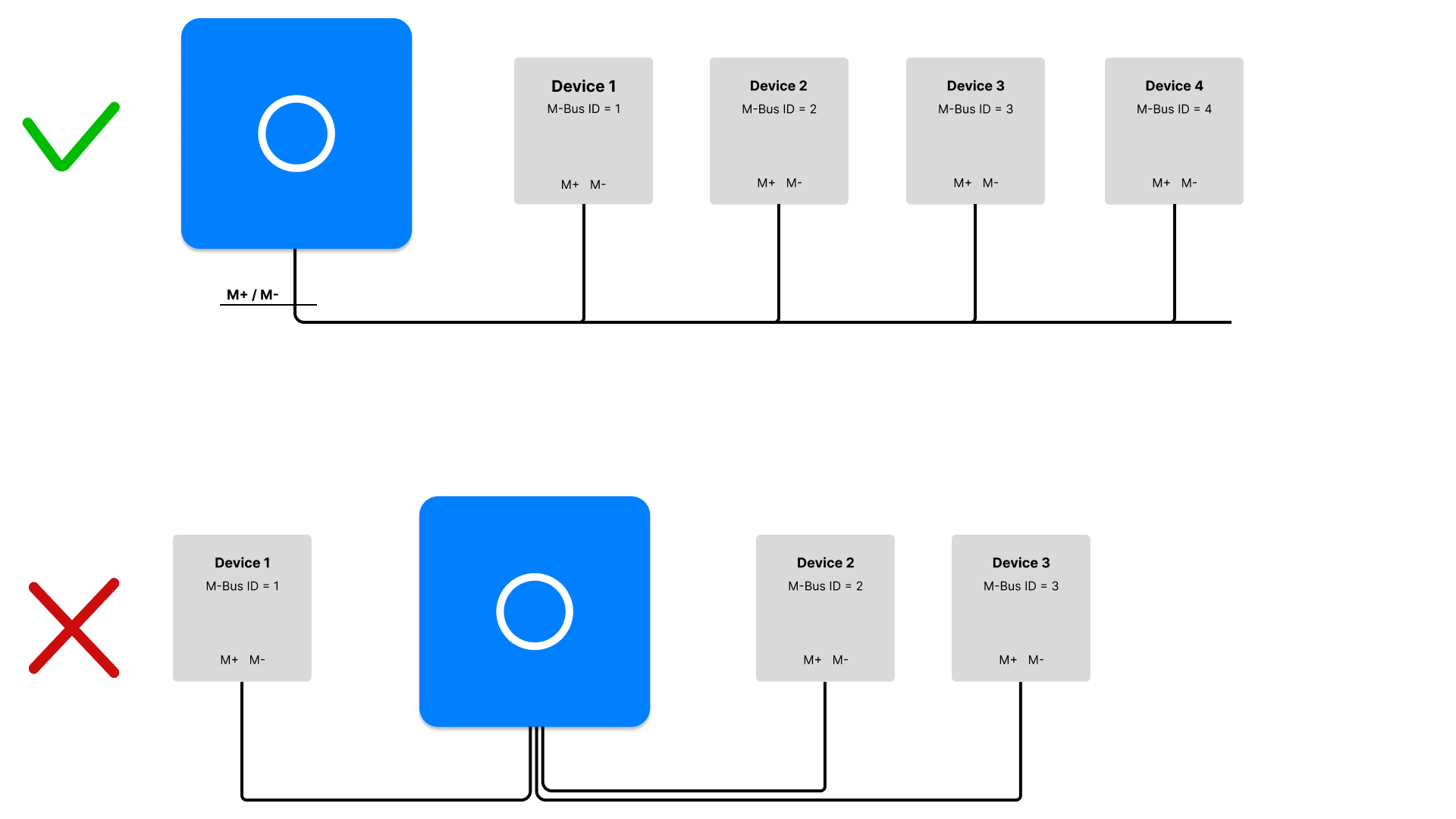
When the Envi.Baseenvi.baseDe energiecontroller van Envitron die apparaten uitleest, aanstuurt en data opslaat achter de hoofdaansluiting. is ordered as a complete installation cabinet, the communication ports are already externally looped through to terminal blocks. No special cables need to be made in that case. Also see Installation cabinets for more information.
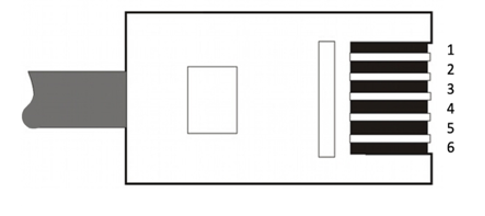
Pin configuration M-Bus port
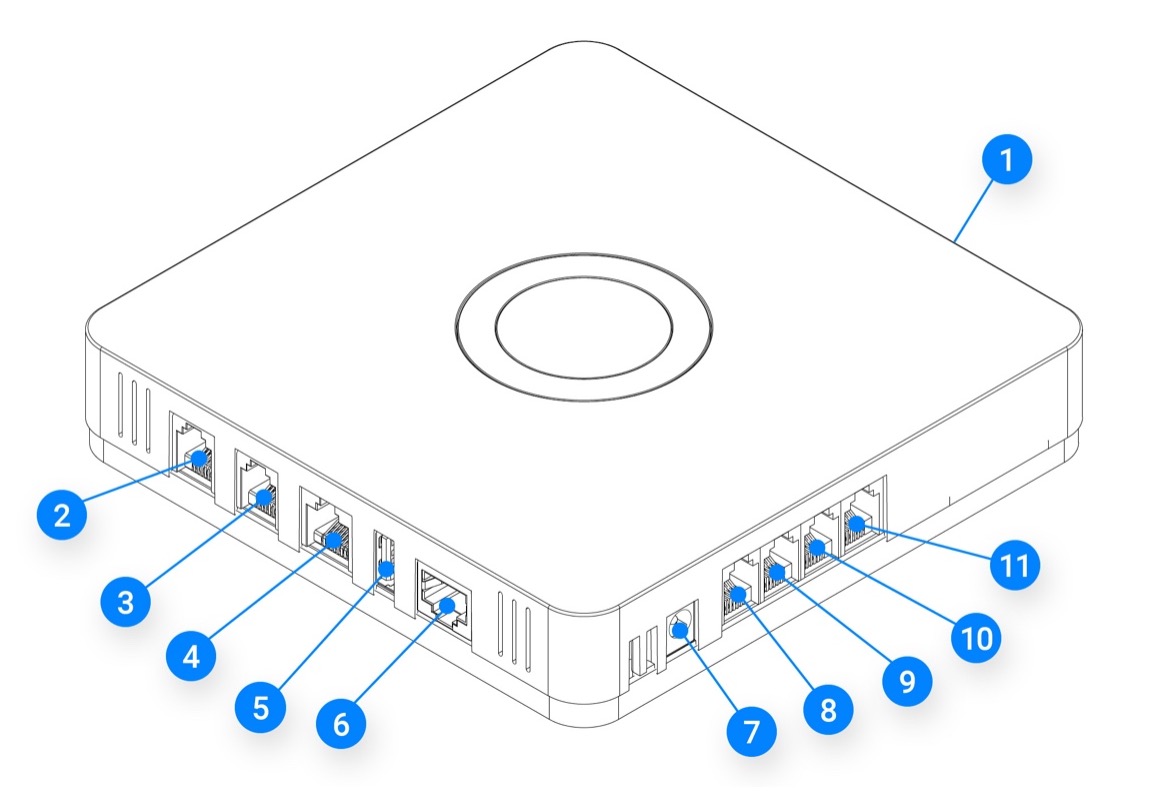
M-Bus port (connection 2)
| Pin | Function |
|---|---|
| 5 | M- |
| 6 | M+ |
Configuration
After connecting, the M-Bus devices must be configured individually according to the manufacturer's instructions. Each device in the M-Bus network must be assigned a unique M-Bus address between 1 and 250. The Envi.Baseenvi.baseDe energiecontroller van Envitron die apparaten uitleest, aanstuurt en data opslaat achter de hoofdaansluiting. communicates at 2400 baud by default. Set the device to the same baud rate.
Once the devices are correctly configured, they can be added to the Envi.Baseenvi.baseDe energiecontroller van Envitron die apparaten uitleest, aanstuurt en data opslaat achter de hoofdaansluiting. via the Envitron installation tool. In the tool, create the relevant device under the correct device category, select the appropriate communication settings and give the device a clear name. This name will also be displayed as such in the portal.
Then test in the installation tool whether the measured values are displayed correctly.
When an M-Bus pulse receiver is used with a pulse meter, it is necessary to first configure it using an M-Bus field tool. These receivers have no display and therefore cannot be configured directly. Using the field tool, the sensor is connected to a computer and configured. The following settings, among others, must be specified:
- the type of measurement (gas, water, heat, etc.)
- the conversion ratio
- the initial meter reading
Technical specifications
| Property | Specification |
|---|---|
| Recommended data cable | Standard 2-wire 0.75mm² signal cable or RJ12 cable (AWG24) |
| Maximum number of devices | 40 M-Bus slavesslaveEen apparaat dat reageert op commando’s van de master. Elk apparaat heeft een uniek adres (ID). |
| Transmission speed | Default: 2400 baud |
| Topology | Serial line (daisy-chain), short branches permitted |
Troubleshooting connection issues
Is a device not coming online or is the bus responding slowly? First check with a multimeter whether voltage is present on the M-Bus connection of the Envi.Baseenvi.baseDe energiecontroller van Envitron die apparaten uitleest, aanstuurt en data opslaat achter de hoofdaansluiting.. To do this, disconnect all devices and measure between M+ and M− of the Envi.Baseenvi.baseDe energiecontroller van Envitron die apparaten uitleest, aanstuurt en data opslaat achter de hoofdaansluiting.. The voltage should be approximately 35 volts.
If no voltage is present, try completely powering down the Envi.Baseenvi.baseDe energiecontroller van Envitron die apparaten uitleest, aanstuurt en data opslaat achter de hoofdaansluiting. for one minute and restarting it. Then measure again to check whether the correct voltage is present.
If voltage is measured, further investigation into the cause can be carried out. For a targeted diagnosis, it is advisable to first get only the first device online and temporarily disconnect all other devices. Check the following points:
-
Incorrect topology (star instead of series)
M-Bus must always be connected in a serial line (daisy-chain). A star or ring structure can cause voltage loss and unreliable communication. -
Wrong or too thin a cable used
RJ12 cables (AWG24) are suitable for up to approximately 60 metres. For longer distances, a 0.75 mm² signal cable must be used. Cables that are too thin or of poor quality cause voltage drop, resulting in meters responding poorly or becoming completely unreadable. -
Defective or damaged M-Bus cable
A broken cable, poor terminal connection or damaged conductor can cause devices to drop out or fail to come online at all. Check the entire cable route, including couplings and terminal connections. Measure the resistance between the conductors; an unexpectedly high or interrupted resistance indicates cable damage. With all devices connected, 35 volts should also be measured between the M+ and M− conductors. -
Non-unique M-Bus addresses
The primary communication address must always be unique across the entire network. Two devices with the same communication address will block communication. -
Incorrect baud rate configured
All devices in the network must use exactly the same baud rate. The Envi.Baseenvi.baseDe energiecontroller van Envitron die apparaten uitleest, aanstuurt en data opslaat achter de hoofdaansluiting. uses 2400 baud by default. Deviating settings will make the device unreachable. -
Too many devices connected (mastermasterHet apparaat dat de communicatie initieert en bepaalt welk slave-apparaat wanneer antwoordt. overload)
The Envi.Baseenvi.baseDe energiecontroller van Envitron die apparaten uitleest, aanstuurt en data opslaat achter de hoofdaansluiting. can power a maximum of 40 M-Bus slavesslaveEen apparaat dat reageert op commando’s van de master. Elk apparaat heeft een uniek adres (ID).. With more devices, voltage drop occurs and meters will drop out. Use an external M-Bus power supply or repeater for larger networks. -
Defective M-Bus meter or converter
One defective device can disrupt the entire M-Bus network. Disconnect devices one by one to determine where the problem lies.